A forex trailing stop is a stop loss that follows the price at a set distance as a trade moves your way, and never moves back. In MetaTrader 4 it starts moving only when the profit reaches that distance, and it runs in your terminal, not on the broker's server: close the platform and it stops following. A trailing stop doesn't guarantee a profit. It can close a trade at a loss, and it can close a good trade long before its target. It is a trade-off, and this article shows both sides with real levels.
We use the same trade as in Forex Risk Management: a $2,000 account, a buy of 0.10 lot of EUR/USD at 1.08512, a stop loss at 1.08312 and a take profit at 1.08912. Where a figure is our own example, we say so.
What Is a Trailing Stop?
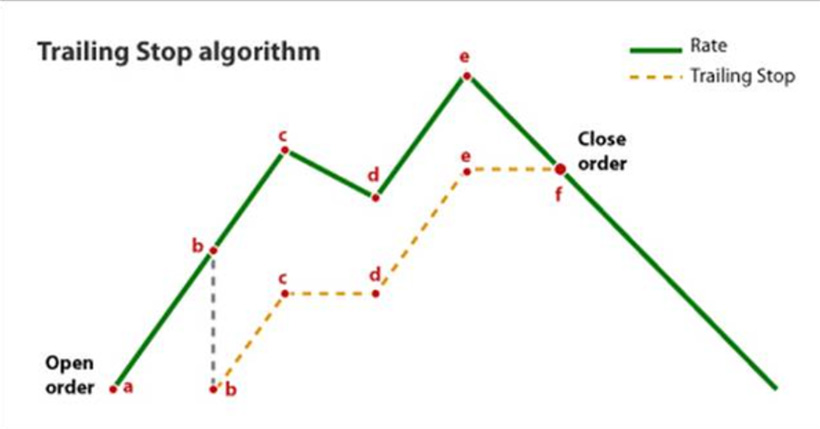
A trailing stop isn't a separate order. It is an automatic way of moving your stop loss. You choose a distance, and from then on the stop follows a profitable trade at that distance. If the price moves back, the stop stays where it is. If the price reaches it, the trade closes like any other stop.
The MT4 Help describes the rule this way: when the profit in points becomes equal to or higher than the distance you set, the terminal places the stop at that distance from the current price. After that it moves the stop as profit grows, and if profit falls, the stop is no longer changed.
This has two consequences that many traders miss:
- Nothing moves until the profit reaches the distance. Until then, your original stop is what protects the trade. A trailing stop with no stop loss set leaves the trade with no stop at all during that time.
- The first move takes the stop to the entry price. With a 20-pip distance the stop first moves at +20 pips, and 20 pips below the price is the entry. Any other distance gives the same result. So the first step doesn't secure a profit: it removes the planned loss.
A Step-by-Step Example
We buy 0.10 lot at the ask, 1.08512, with the bid at 1.08500. One pip is worth $1. We set a trailing stop of 200 points. On a 5-digit quote, 200 points = 20 pips. The original stop at 1.08312 risks $20, or 1% of the account. On a buy, MT4 checks the stop against the bid:
| Bid | Profit | Stop loss | What happens |
|---|---|---|---|
| 1.08612 | +10 pips | 1.08312 | Too early, nothing moves |
| 1.08712 | +20 pips | 1.08512 | First move, to the entry |
| 1.08812 | +30 pips | 1.08612 | Stop follows the price |
| 1.08752 | +24 pips | 1.08612 | Pullback, stop stays |
| 1.08612 | +10 pips | hit | Closed at +$10 |
The trade closes at +10 pips, or +$10, and the balance is $2,010. Swap and commission are not included. The take profit at 1.08912 was never reached.
The Same Trade on a Sell
On a sell everything is mirrored: the stop starts above the price and moves down, and MT4 checks it against the ask. We sell 0.10 lot at the bid, 1.08500, with a stop at 1.08700 and the same 200-point trail:
| Ask | Profit | Stop loss |
|---|---|---|
| 1.08300 | +20 pips | 1.08500 |
| 1.08200 | +30 pips | 1.08400 |
| 1.08400 | +10 pips | hit, closed at +$10 |
The MT4 chart shows the bid by default, so on a sell the stop can trigger while the line on the chart hasn't reached it. If the spread widens, that gap grows (see Short Selling in Forex).
How to Set a Trailing Stop in MT4
- Open the position, and set a normal stop loss.
- In the Terminal window, on the Trade tab, right-click the position.
- Choose Trailing Stop and pick a distance from the list, or set your own with Custom level.
- To turn it off, choose None in the same menu. Delete All turns off all trailing stops.
The distance is in points, not pips, and it can't be a percentage. On 5-digit quotes such as 1.08512, 1 pip = 10 points. A value of 20 here would mean just 2 pips, not much more than the 1.2-pip spread in our example. More in What Is a Pip in Forex?
Three details from the MT4 Help are worth knowing:
- Each position can have only one trailing stop.
- It is processed once per tick, and each change of the stop is recorded in the terminal's Journal.
- If several orders with a trailing stop are open on one symbol, only the trailing stop of the latest order is processed. Don't count on it for a group of positions on the same pair.
Your Terminal Has to Stay On
This is the detail that matters most, and many articles leave it out. In MT4, stop loss and take profit sit on the broker's server. The trailing stop doesn't:
| Works from | If the terminal is closed | |
|---|---|---|
| Stop loss | Broker's server | Still works |
| Take profit | Broker's server | Still works |
| Trailing stop | Your terminal | Stops moving |
If you shut down your computer, or the terminal crashes or loses its connection, the trade isn't left unprotected: the last stop the trailing stop set stays on the server and still triggers. It simply stops following the price. In our example, if the terminal closes with the stop at 1.08512, that level stays at 1.08512 however far the price rises.
The trailing stop runs only in the terminal where you set it, so if you need it to keep working while your computer is off, the terminal has to run somewhere else. That is what a forex VPS is for. The same applies to an Expert Advisor with its own trailing logic: it moves the stop only while it is running in a terminal.
The Trade-Off: Trailing Stop vs Fixed Exits
In our example the trailing stop closed the trade at +$10. Is that good? It depends on what the price does next, and nobody knows that in advance:
| After 1.08612, the price… | Fixed exit | Trailing stop |
|---|---|---|
| falls on to 1.08312 | Stop: −$20 | +$10 |
| turns back up to 1.08912 | Target: +$40 | +$10 |
In the first case the trailing stop kept a winner from turning into a loser. In the second, an ordinary pullback closed the trade well short of its target. Neither result proves anything: these are two paths of one trade, not a forecast.
For experienced traders, the model from Forex Risk Management applies here too. On a random price with no direction and no costs, no exit rule changes the average result, a trailing stop included (our reasoning, a standard result in probability). It changes the shape of the results, not the average. Any edge still has to come from the entry.
How to Choose the Distance
There is no best distance, and be wary of any fixed number. Take it from how your pair and timeframe actually move:
- Measure normal pullbacks. Look at the last trending moves on your chart and see how far the price pulled back without ending the move. The distance has to be wider than that, or normal noise will close you.
- Volatility works against tight trailing. The more a pair swings, the wider the distance has to be. A trailing stop isn't "best for volatile markets": swings there hit it more often.
- Match the timeframe. Pullbacks on H4 are larger than on M5, so a distance that suits a scalp will be far too tight for a swing trade.
- Keep it well above the spread. A sell in particular can be closed by a wider spread alone.
- Check the distance against your target. In our example a trail of 400 points would start only at +40 pips, exactly where the take profit closes the trade, so it would never do anything.
| Distance | Benefit | Cost |
|---|---|---|
| Tighter | Starts sooner, follows closer | Ordinary pullbacks close the trade |
| Wider | Gives the trade room | Starts later, gives back more |
Test any setting on a demo account first. A strong trending move suits a trailing stop better than a sideways market, where the price keeps pulling back to it. Size the trade from the original stop, not from the trailing distance: our lot size calculator does the math.
Limitations
- It can't see a reversal. It knows nothing about trends or news. It only reacts when the price comes back by the set distance.
- It can still close at a loss. Before the first move, the original stop applies: −$20 in our example.
- It is still a stop, so it can slip. Suppose the stop stands at 1.08612 and the market opens on Monday at 1.08452. The stop fills at about that price: −6 pips, or −$6, even though the stop was above the entry (our illustration). More on gaps in Money Management in Forex.
- A stop at the entry isn't quite zero. Swap and commission still count.
- It needs a running terminal, as shown above.
FAQ
Does a trailing stop work when MT4 is closed?
No. In MT4 the trailing stop runs in the client terminal, not on the broker's server. If the terminal is closed, the stop stops moving, but the last level it set stays on the server and still triggers. To keep it working while your computer is off, run the terminal on a VPS.
Does a trailing stop guarantee a profit?
No. Until the profit reaches the set distance the stop doesn't move, so the trade can still hit the original stop at a loss. A gap can also fill the stop at a worse price, even below the entry.
What does 200 points mean in a trailing stop?
On 5-digit quotes such as EUR/USD at 1.08512, 10 points = 1 pip, so 200 points = 20 pips. The stop starts moving when the profit reaches 20 pips, and then follows the price at that distance.
Is a trailing stop better than a fixed take profit?
Neither is better in general. In our example a trailing stop closed at +$10. If the price then fell, that beat the fixed stop at −$20. If it went on to the target, it fell short of the fixed +$40. It is a trade-off that depends on what the price does next.
The Bottom Line
- A trailing stop follows the price at a set distance and never moves back.
- In MT4 it starts only when the profit reaches that distance, and the first move goes to the entry price.
- The distance is in points: on 5-digit quotes 200 points = 20 pips.
- Stop loss and take profit sit on the server, but the trailing stop runs in your terminal. Close the terminal and it stops following.
- It doesn't guarantee a profit. It trades some of a possible larger win for protection against a reversal.
If you are just getting started, read our step-by-step guide to start trading.
Sources: MetaTrader 4 Help, Trailing Stop and Order Types. Examples are our own calculations.
This article is educational and is not investment advice. Trading leveraged products involves risk of loss.